

Staff timesheets, earned pay and salary calculation
In productionFrom the timesheet to the payment list, on one platform.
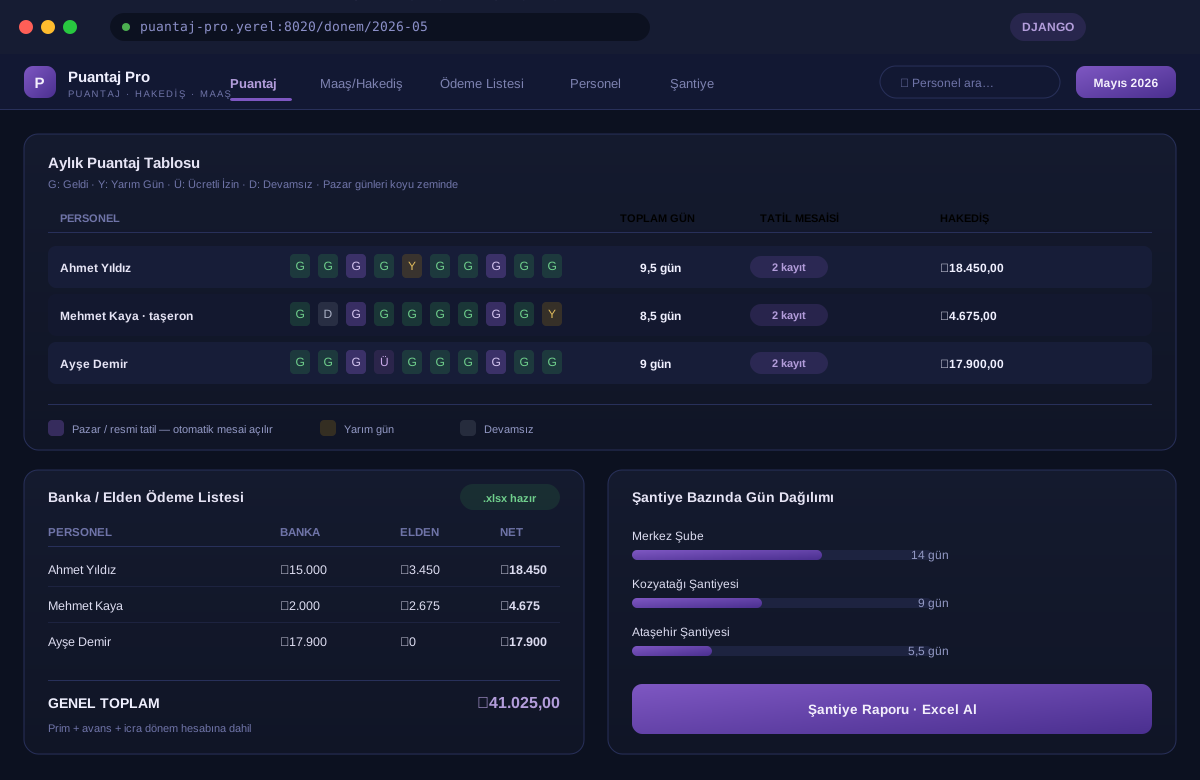
A multi-company platform for businesses with salaried staff and subcontracted workers: it records the daily timesheet on a monthly grid or from the field by phone, turns Sunday and public holiday work into overtime by itself, and combines salary, earned pay, bonus, advance and garnishment in a single calculation.
How it works today
The timesheet is kept on a paper sheet or in Excel and added up line by line at the end of the month. The extra day's pay for someone who worked on a Sunday or a holiday is remembered by hand; when two holidays fall on the same day it is either forgotten or paid twice. Salaried staff and daily-wage subcontractors are calculated in separate tables, advances and garnishments are deducted somewhere else, and the answer to who worked at which site sits in yet another notebook.
What the product does
A monthly timesheet grid where each employee gets one code per day. Overtime is created by itself for anyone who works on a Sunday or a public holiday; salary, earned pay, bonus, advance and garnishment come together in one calculation, and the result becomes a bank and cash payment list. The field supervisor marks the day from a phone, and each day's site is recorded.
How it differs from paper sheets and Excel
This product's competitor is not other software. It is the sheet that gets added up at the end of every month. Here is exactly where they differ:
| Paper sheet and Excel | With Puantaj Pro Suite | |
|---|---|---|
| Daily timesheet | A paper sheet or a spreadsheet, added up row by row at month end. | One code per day on a monthly grid; total days are calculated automatically. |
| Sundays and holidays | The extra day's pay is remembered by hand; when a Sunday and a holiday coincide it can be paid twice. | Marking 'Present' or 'Half Day' on a Sunday or public holiday opens the overtime record by itself; if both fall on the same day it is paid once. |
| Salaried and daily-wage | Salaried staff and subcontractors in separate tables with separate formulas. | Company staff on a 30-day basis of the monthly salary, subcontractors on their daily wage; calculated on the same screen. |
| Deductions | Advances and garnishments are remembered from elsewhere and deducted by hand. | Bonus, advance and garnishment records feed the period calculation; the net amount payable comes out on one line. |
| Payment | The amounts paid to the bank and in cash are worked out separately. | The bank/cash split is entered; the bank list is exported to Excel. |
| Sites | Who worked where on which day lives in a separate notebook, or is not recorded at all. | Each day's site is saved together with the timesheet; a per-site report is available. |
| Documents | Contracts and reports are filled in by hand from a blank template every time. | Fixed-term employment contract, resignation letter, absence report and pay envelope are filled from the employee record. |
Daily timesheet
Paper sheet and ExcelA paper sheet or a spreadsheet, added up row by row at month end.
With Puantaj Pro Suite
One code per day on a monthly grid; total days are calculated automatically.
Sundays and holidays
Paper sheet and ExcelThe extra day's pay is remembered by hand; when a Sunday and a holiday coincide it can be paid twice.
With Puantaj Pro Suite
Marking 'Present' or 'Half Day' on a Sunday or public holiday opens the overtime record by itself; if both fall on the same day it is paid once.
Salaried and daily-wage
Paper sheet and ExcelSalaried staff and subcontractors in separate tables with separate formulas.
With Puantaj Pro Suite
Company staff on a 30-day basis of the monthly salary, subcontractors on their daily wage; calculated on the same screen.
Deductions
Paper sheet and ExcelAdvances and garnishments are remembered from elsewhere and deducted by hand.
With Puantaj Pro Suite
Bonus, advance and garnishment records feed the period calculation; the net amount payable comes out on one line.
Payment
Paper sheet and ExcelThe amounts paid to the bank and in cash are worked out separately.
With Puantaj Pro Suite
The bank/cash split is entered; the bank list is exported to Excel.
Sites
Paper sheet and ExcelWho worked where on which day lives in a separate notebook, or is not recorded at all.
With Puantaj Pro Suite
Each day's site is saved together with the timesheet; a per-site report is available.
Documents
Paper sheet and ExcelContracts and reports are filled in by hand from a blank template every time.
With Puantaj Pro Suite
Fixed-term employment contract, resignation letter, absence report and pay envelope are filled from the employee record.
Modules
Monthly timesheet grid
Employees in rows, days of the month in columns. Each day gets one of 5 codes: Present, Half Day, Paid Leave, Unpaid Leave, Absent. Sundays are highlighted; days outside the start and end date of employment cannot be edited.
HOW WE START
Four steps from a demo request to production use.
-
Demo request
Fill in the form or write to us directly. Tell us the size of your business and how you work today.
-
Live walkthrough
We show the product over a screen share, on data resembling yours. This is where the questions get asked.
-
Trial account
An account is opened for your business. You enter your own materials, prices and rooms and run one real job end to end.
-
Go live
If you decide to proceed, the account moves to the full version, your existing data is migrated and your users are set up.
Connections
Plans
The plan contents are below; we settle the figure based on company size and number of users in a call and send a written quote.
PlansWhat buyers ask before they decide.
Can my data get mixed up with other companies?
No. Each company's data is separated in the database by its own identity, and queries enforce that separation. Every release is checked by automated tests that one company's records cannot be reached with another company's account.
Does it produce official payroll and social security filings?
No. Puantaj Pro Suite calculates the timesheet, holiday overtime, earned pay and payment split. Official payroll, social security declarations and tax calculation are the job of your accountant or payroll software; the timesheet and payment reports can be handed over as Excel files.
Can I import my existing staff list?
A staff list in table form can be imported. We look at your file and agree on the scope of the import together; it is not an automatic Excel import feature.
How many users can I add?
Users are added by the company administrator. A field supervisor can get a user that only sees the mobile timesheet screen; salaries and company settings stay with the administrator.
Are public holidays built in?
7 fixed-date public holidays come built in. Holidays whose date changes every year, such as Ramadan and Sacrifice Feast, are added to the shared holiday list; a day that is not on the list does not create holiday overtime.
Can I change overtime and pay rates?
Yes. Half-day rate, hourly overtime multiplier, daily working hours and Sunday/holiday overtime rates are your company's own settings and do not affect other companies.
From the timesheet to the payment list, on one platform.
The month-end tally disappears, holiday overtime is neither forgotten nor paid twice, and the payment list comes straight from the timesheet. Who worked at which site on which day is available as a report.
Technical summary
| Server | Python 3, Django |
|---|---|
| Database | PostgreSQL (production), SQLite (development) |
| Deployment | Docker / Docker Compose |
| Document output | PDF (WeasyPrint), Excel (.xlsx) |
| Mobile | Mobile timesheet screen for phone browsers |
| Access | Browser; no separate installation |
| Multi-company | Yes, data is separated per company |
| Interface language | Turkish |