

3D warehouse layout, stock and storage billing
In productionA 3D digital twin of your cold store.
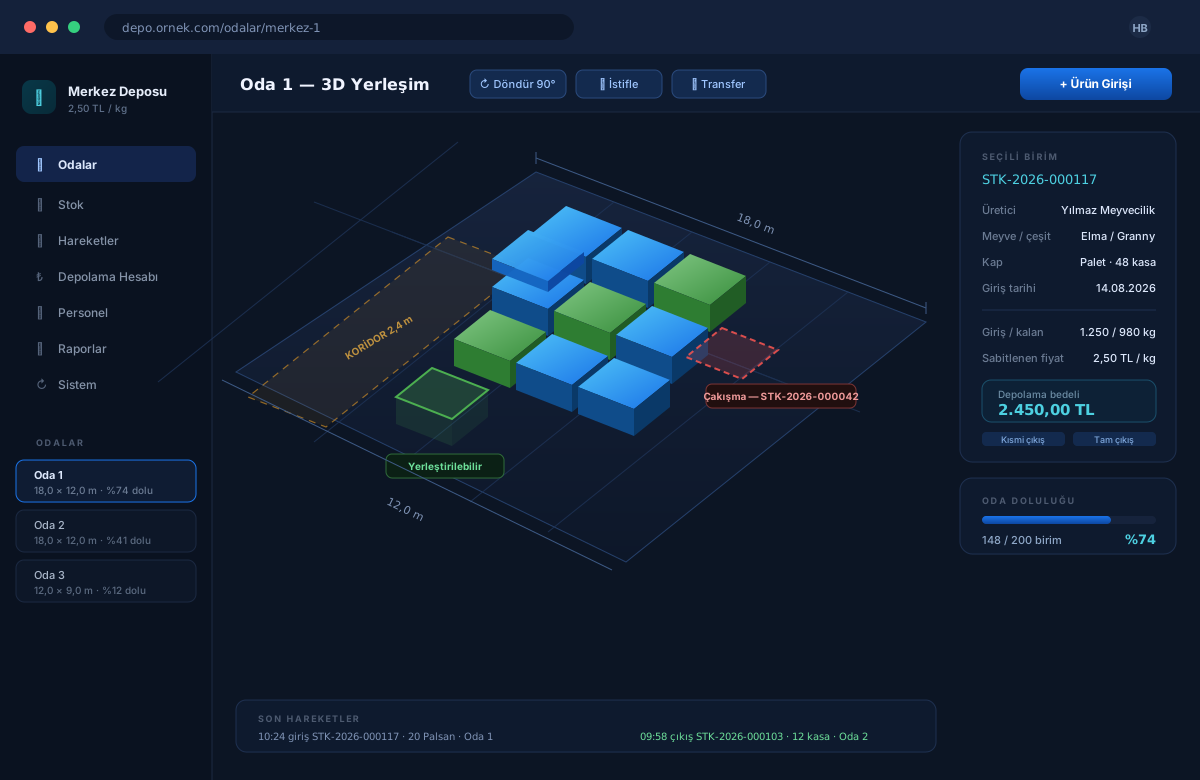
A warehouse management system for fruit cold storage that models rooms at their real dimensions, places pallets by drag and drop, and validates collision, stacking and aisle rules on the server.
How it works today
What is in which room, whose pallet is whose, and how full a room is. The answers live in a ledger, a spreadsheet and the warehouse manager's head. Where a pallet goes is decided on the floor; an aisle gets blocked, a stack ends up unbalanced, and things have to be moved again later. At the end of the season the storage charge is worked out by hand from the remaining kilograms, and a price change corrupts the history.
What the product does
A 3D layout screen where rooms are modelled in metres and every pallet and Palsan unit stands in the room as its own icon. Before a unit is placed, the rules are validated on the server: it does not overlap another unit, does not block the aisle band, and the stack is balanced. Storage is always billed as remaining kilograms at the price recorded on entry; a later price change never rewrites past records.
How it differs from a ledger and a spreadsheet
This product's competitor is not other software — it is the warehouse ledger, a spreadsheet, and the manager's memory. Here is exactly where they differ:
| Ledger and spreadsheet | With this system | |
|---|---|---|
| What is in the room | Intake and release go into a ledger; where each pallet stands lives in the manager's head. | The room is modelled at real dimensions; every pallet and Palsan unit stands in its own place. |
| Placement decisions | Made on the floor. An aisle gets blocked, a stack ends up unbalanced, things get moved again. | Rules are validated on the server before placement and shown on screen as a green or red ghost. |
| Storage charge | Remaining kilograms are worked out by hand at the end of the season, and the figure is open to argument. | Remaining kg × the price fixed at intake. The figure is on screen at any moment and rests on a record. |
| Price changes | Entering a new price shifts the old calculations too. | The price is fixed to the record on intake; a later change never rewrites past records. |
| Multiple warehouses | A separate file per warehouse, and it gets unclear whose price is whose. | Each warehouse has its own kg price and ledger; the owner sees all of them from one login. |
| Reports | Anything going to accounting is compiled by hand. | Stock, occupancy, intake, release, producer and payment reports export to CSV, XLSX and PDF. |
| Traceability | Who changed a record, and when, is not recorded. | The movement history is never deleted, and who changed what is kept in the audit log. |
What is in the room
Ledger and spreadsheetIntake and release go into a ledger; where each pallet stands lives in the manager's head.
With this system
The room is modelled at real dimensions; every pallet and Palsan unit stands in its own place.
Placement decisions
Ledger and spreadsheetMade on the floor. An aisle gets blocked, a stack ends up unbalanced, things get moved again.
With this system
Rules are validated on the server before placement and shown on screen as a green or red ghost.
Storage charge
Ledger and spreadsheetRemaining kilograms are worked out by hand at the end of the season, and the figure is open to argument.
With this system
Remaining kg × the price fixed at intake. The figure is on screen at any moment and rests on a record.
Price changes
Ledger and spreadsheetEntering a new price shifts the old calculations too.
With this system
The price is fixed to the record on intake; a later change never rewrites past records.
Multiple warehouses
Ledger and spreadsheetA separate file per warehouse, and it gets unclear whose price is whose.
With this system
Each warehouse has its own kg price and ledger; the owner sees all of them from one login.
Reports
Ledger and spreadsheetAnything going to accounting is compiled by hand.
With this system
Stock, occupancy, intake, release, producer and payment reports export to CSV, XLSX and PDF.
Traceability
Ledger and spreadsheetWho changed a record, and when, is not recorded.
With this system
The movement history is never deleted, and who changed what is kept in the audit log.
Modules
3D layout
Rooms modelled in metres. Drag-and-drop placement, 90-degree rotation, stacking, moving within a room and transfer between rooms. Every container stands in the room as its own icon: an intake of 20 Palsan units appears as 20 separate units.
HOW WE START
Four steps from a demo request to production use.
-
Demo request
Fill in the form or write to us directly. Tell us the size of your business and how you work today.
-
Live walkthrough
We show the product over a screen share, on data resembling yours. This is where the questions get asked.
-
Trial account
An account is opened for your business. You enter your own materials, prices and rooms and run one real job end to end.
-
Go live
If you decide to proceed, the account moves to the full version, your existing data is migrated and your users are set up.
Connections
What buyers ask before they decide.
Could my data get mixed up with another business's?
No. Every business's data is separated by its own identifier in the database; different businesses never see each other's data on any screen.
How many rooms can I open on the trial account?
A warehouse with no live licence (a demo) may open up to 2 rooms. That limit is lifted once a licence is in place.
If I change the price, are past records affected?
No. The storage charge is fixed to the record on stock intake; a later price change never rewrites past records.
Which plan includes personnel and day-labour tracking?
Personnel records, day-labourer groups and payment tracking per group are available on the Pro and Enterprise plans.
What formats can I get reports in?
Stock, occupancy, intake, release, producer and payment reports all export to CSV, XLSX and PDF.
Can I see who changed what?
Yes. The movement history is never deleted, and who changed what and when is kept in the audit log.
A 3D digital twin of your cold store.
Occupancy and the location of goods are visible on screen, a placement mistake is caught on the screen rather than on the floor, and the storage charge rests on a record nobody has to argue about.
Technical summary
| Server | Python 3.12, FastAPI, SQLAlchemy 2.0 |
|---|---|
| Interface | React 18, TypeScript, React Three Fiber (Three.js) |
| Database | PostgreSQL 14+ (production), SQLite (development) |
| Deployment | Docker / Docker Compose, Alembic migrations |
| Browser | A current browser with WebGL 2 (for the 3D view) |
| Tests | 559 server + 74 interface tests, also verified with end-to-end smoke tests |
| Multi-tenant | Yes, data separated per business |
| Interface language | Turkish |